



CFD_DOMAIN

CFD

*CFD_DOMAIN
"Optional title"
coid, scheme
entype, enid, $\Delta$, air, geo_update, xsmooth, blocking_update, blocking_type
$x_0$, $y_0$, $z_0$, $x_1$, $y_1$, $z_1$
bc${}_{x0}$, bc${}_{y0}$, bc${}_{z0}$, bc${}_{x1}$, bc${}_{y1}$, bc${}_{z1}$
$t_{end}$

Parameter definition

Variable
Description
coid
Command ID
scheme
Advection scheme
options:
1 $\rightarrow$ Mixed 1st and 2nd order
2 $\rightarrow$ Full 2nd order
default: 1
entype
Structure entity type for fluid structure interaction
options: P, PS, ALL
enid
Structure entity ID
$\Delta$
Cell size
quantity: Length
air
Option to begin with an air filled domain (before adding other materials)
options:
0 $\rightarrow$ domain is empty
1 $\rightarrow$ domain is filled with air
geo_update
Coupling geometry update interval (number of time steps)
default: no update (geometry is assumed to be fixed in space)
xsmooth
Spatial pressure smoothing level
default: inactive
blocking_update
Blocking update interval (number of time steps)
default: no blocking
blocking_type
CFD cell blocking criterion in FE coupling
options:
0 $\rightarrow$ $\gt 0 \%$ overlap
1 $\rightarrow$ $100 \%$ overlap
2 $\rightarrow$ $\gt 50 \%$ overlap
$x_0$
CFD domain minimum x-coordinate
quantity: Length
$y_0$
CFD domain minimum y-coordinate
quantity: Length
$z_0$
CFD domain minimum z-coordinate
quantity: Length
$x_1$
CFD domain maximum x-coordinate
quantity: Length
$y_1$
CFD domain maximum y-coordinate
quantity: Length
$z_1$
CFD domain maximum z-coordinate
quantity: Length
bc${}_{x0}$
Boundary condition at $x=x_0$
options:
0 $\rightarrow$ non-reflecting boundary
1 $\rightarrow$ reflecting boundary
bc${}_{y0}$
Boundary condition at $y=y_0$
options:
0 $\rightarrow$ non-reflecting boundary
1 $\rightarrow$ reflecting boundary
bc${}_{z0}$
Boundary condition at $z=z_0$
options:
0 $\rightarrow$ non-reflecting boundary
1 $\rightarrow$ reflecting boundary
bc${}_{x1}$
Boundary condition at $x=x_1$
options:
0 $\rightarrow$ non-reflecting boundary
1 $\rightarrow$ reflecting boundary
bc${}_{y1}$
Boundary condition at $y=y_1$
options:
0 $\rightarrow$ non-reflecting boundary
1 $\rightarrow$ reflecting boundary
bc${}_{z1}$
Boundary condition at $z=z_1$
options:
0 $\rightarrow$ non-reflecting boundary
1 $\rightarrow$ reflecting boundary
$t_{end}$
Deactivation time or function (fcn)
quantity: Time
options: constant, fcn
default: no CFD deactivation time

Description

CFD_DOMAIN activates a built-in CFD solver for compressible flow. The command is used to define the computational domain (location in space and boundary conditions), grid size, and to specify the interaction with embedded FE parts.

Accompanying commands are CFD_GAS, CFD_HE and CFD_DETONATION. These commands are used to fill the CFD domain with gases and high explosives and to define detonation points (if applicable).

Coupling

Coupling with Finite Element structures is either defined with parameters entype, enid or with the command CFD_STRUCTURE_INTERACTION.

CFD cells that are intersected by coupled Finite Element are treated as dead (empty). The geo_update parameter controls the interval (number of time steps) at which the intersection is updated.

blocking_type controls the level of intersection (or overlap) between the FE and CFD grid for a cell too be treated as dead. As default a small overlap is enough for a cell to be deactivated. This ensures that gas will not leak through thin structures. However, a consquence is also that a larger CFD region will be deactivated than the physical volume of the overlapping FE object.

The blocking_update parameter activates a check that prevents interaction between CFD cells and Finite Element faces shielded by (located behind) other faces. For performance reasons, this check is inactive by deafult.

The spatial pressure smoothing option is used to filter noise in the CFD-FE coupling interface. Typical xsmooth values range between 0 (no smooting) and 10 (strong smoothing).

Full coupling is automatically activated between CFD and SPH and between CFD and discrete soil particles.

De-activation and activation

The CFD calculations can be terminated by specifying an end time $t_{end} > 0$. If specifying a function (fcn) instead of a time, the CFD solver is inactive as long as the function value is positive. Hence this option can be used as both a de-activation and as an activation switch.

Example

Air blast loaded rigid plate

A simple example with a TNT charge (diameter $60 \mathrm{mm}$) detonated above a rigid plate at stand-off distance $200 \mathrm{mm}$.
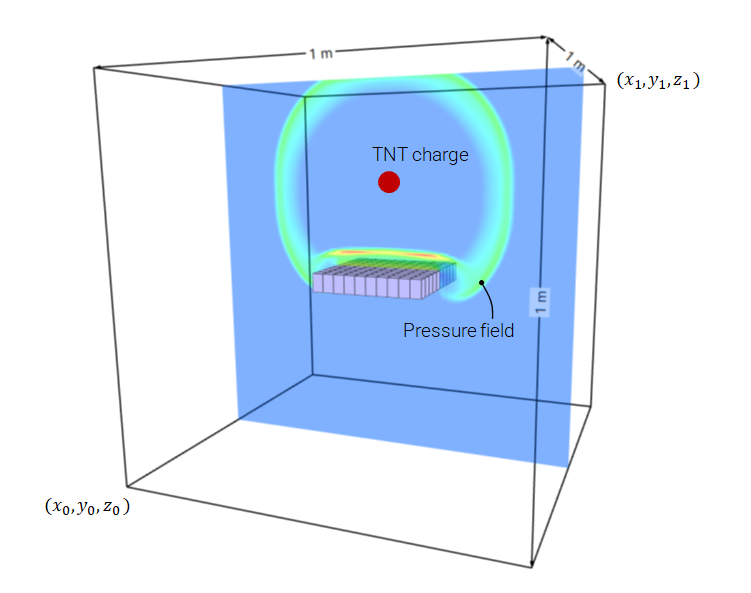
Alternative 1 - air is defined with the command CFD_GAS

*UNIT_SYSTEM SI *PARAMETER L = 1.0, "CFD domain size" W = 0.3, "plate size" h = 0.05, "plate thickness" soff = 0.2, "stand-off distance" R = 0.03, "charge radius" delta = 0.008, "grid size" *TIME 2.0e-4 # # --- MESH --- # *COMPONENT_BOX "plate" 1, 1, 10, 10, 1 [-%W/2], [-%W/2], [-%h], [%W/2], [%W/2], 0 # # --- MATERIAL --- # *MAT_RIGID 1, 7800.0 # # --- PART --- # *PART "plate" 1, 1 # # --- CFD --- # *CFD_DOMAIN "air blast" 1 ALL, 0, [%delta] [-%L/2], [-%L/2], [-%L/2], [%L/2], [%L/2], [%L/2] *CFD_GAS "air" 1 AIR, 1 *GEOMETRY_BOX 1 [-%L/2], [-%L/2], [-%L/2], [%L/2], [%L/2], [%L/2] *CFD_HE "TNT" 2 TNT, 2 *GEOMETRY_SPHERE 2 0, 0, [%soff], [%R] *CFD_DETONATION 1 0, 0, [%soff] *END

Alternative 2 - global domain is filled with air by setting air=1 in CFD_DOMAIN

*UNIT_SYSTEM SI *PARAMETER L = 1.0, "CFD domain size" W = 0.3, "plate size" h = 0.05, "plate thickness" soff = 0.2, "stand-off distance" R = 0.03, "charge radius" delta = 0.008, "grid size" air = 1, "fill global domain with air" *TIME 2.0e-4 # # --- MESH --- # *COMPONENT_BOX "plate" 1, 1, 10, 10, 1 [-%W/2], [-%W/2], [-%h], [%W/2], [%W/2], 0 # # --- MATERIAL --- # *MAT_RIGID 1, 7800.0 # # --- PART --- # *PART "plate" 1, 1 # # --- CFD --- # *CFD_DOMAIN "air blast" 1 ALL, 0, [%delta], [%air] [-%L/2], [-%L/2], [-%L/2], [%L/2], [%L/2], [%L/2] *CFD_HE "TNT" 2 TNT, 2 *GEOMETRY_SPHERE 2 0, 0, [%soff], [%R] *CFD_DETONATION 1 0, 0, [%soff] *END
Restart and mapping from fine to coarse grid

Large scaled distances are computationally challenging. The initial shock wave formation might require a grid resolution that is too fine to be used for the global domain. A possible solution is to model the process in two steps:

Step 1 - detonation and initial blast wave formation

This initial part of the process is modeled with a fine grid. Symmetry conditions are utilized. At termination a file impetus_state_cfd1.bin is generated. This file contains information about the final CFD state, i.e. densities, energies and velocities in all cells of the CFD grid.
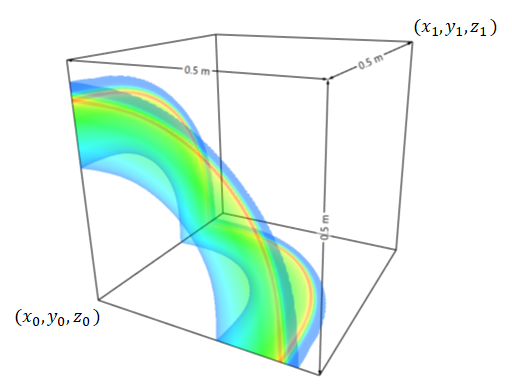
*UNIT_SYSTEM SI *PARAMETER L = 0.5, "CFD domain size" R = 0.03, "charge radius" delta = 0.005, "grid size" air = 1, "fill global domain with air" *TIME 2.0e-4 # # --- CFD --- # *CFD_DOMAIN "air blast" 1 ALL, 0, [%delta], [%air] 0, 0, 0, [%L], [%L], [%L] 1, 1, 1, 0, 0, 0 *CFD_HE "C4" 1 C4, 1 *GEOMETRY_SPHERE 1 0, 0, 0, [%R] *CFD_DETONATION 1 0, 0, 0 *END

Step 2 - blast wave propagation

The results from Step 1 are imported and mapped to a corser grid and the shock wave propagation can be tracked over larger distances. Note that the solver identifies the 1/8 symmetry conditions from Step 1 and automatically mirrors the results to full 3D. The binary state file from Step 1 (impetus_state_cfd1.bin) is included from cfd_data.k. Hence, the positioning parameters in the INCLUDE command will also control the positioning of the data in the binary state file.
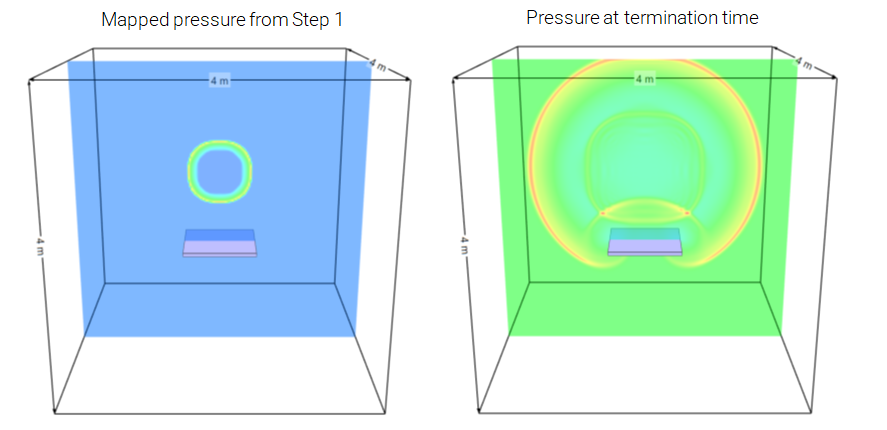
*UNIT_SYSTEM SI *PARAMETER L = 4.0, "CFD domain size" W = 1.0, "plate size" h = 0.05, "plate thickness" soff = 1.0, "stand-off distance" delta = 0.02, "grid size" air = 1, "fill global domain with air" *TIME 2.0e-3 # # --- MESH --- # *COMPONENT_BOX "plate" 1, 1, 10, 10, 1 [-%W/2], [-%W/2], [-%soff/2-%h], [%W/2], [%W/2], [-%soff/2] # # --- MATERIAL --- # *MAT_RIGID 1, 7800.0 # # --- PART --- # *PART "plate" 1, 1 # # --- CFD --- # *INCLUDE cfd_data.k 1, 1, 1 0, 0, 0, 0, 0, [%soff/2] *CFD_DOMAIN "air blast" 1 ALL, 0, [%delta], [%air] [-%L/2], [-%L/2], [-%L/2], [%L/2], [%L/2], [%L/2] *END
# # File: cfd_data.k *INCLUDE_BINARY ../Step_1/impetus_state_cfd1.bin *END
CFD activation and de-activation

Below is a contact detonation example, in which a switching function is used to activate and deactivate the CFD solver. Initially the explosive charge is modelled using Finite Elements. As the elements get distorted we shift to CFD ($t=30\mu s$) and follow the interaction with the target plate until the impulse transfer is nearly complete ($t=100 \mu s$). From this point the CFD solver is deactivated and we only follow plate until termination ($t=500 \mu s$).
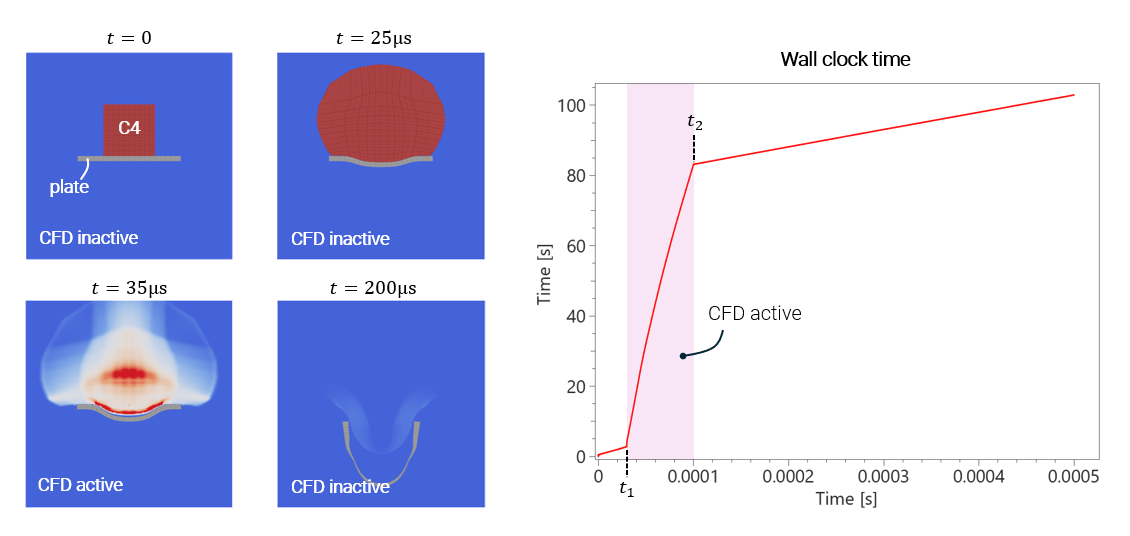

Saving wall clock time by only having the CFD engine active when needed
*UNIT_SYSTEM SI *PARAMETER %t1 = 3.0e-5, "Time for E2C and for CFD activation" %t2 = 1.0e-4, "Time for CFD deactivation" %tend = 5.0e-4, "Termination time" # # --- TIME --- # *TIME [%tend] # # --- MESH --- # *COMPONENT_BOX "C4" 1, 1, 10, 5, 10 -0.05, 0, 0, 0.05, 0.05, 0.1 *COMPONENT_BOX "Plate" 2, 2, 20, 10, 1 -0.1, 0, -0.01, 0.1, 0.1, 0.0 *CHANGE_P-ORDER ALL, 0, 2 # # --- MATERIAL --- # *MAT_OBJECT "C4" "{34b95a1a-c7fa-4c63-a8c7-4c4f729063ef}", 1 *MAT_METAL 2, 7800.0, 210.0e9, 0.3 2 *FUNCTION 2 1.0e9 + 1.0e9*epsp^0.3 # # --- PART --- # *PART "C4" 1, 1 "Plate" 2, 2 # # --- DETONATION --- # *DETONATION 1 P, 1, 0, 0, 0.1 # # --- CFD --- # *CFD_DOMAIN 1 ALL, 0, 0.002, 1, 1 -0.2, 0, -0.2, 0.2, 0.2, 0.2 0, 1, 0, 0, 0, 0 fcn(1000) *FUNCTION 1000 1 - H(t - %t1) + H(t - %t2) # # --- STABILIZE AND DEACTIVATE --- # *ACTIVATE_ELEMENTS "C4" 1, P, 1, 0, fcn(1001) *LOAD_SURFACE_SMOOTHING 1 P, 1 *LOAD_ELEMENT_SMOOTHING 1 P, 1 *FUNCTION 1001 H(t - %t1) # # --- CONTACT --- # *CONTACT "all to all" 1 ALL, 0, ALL, 0, 0, 1.0e15 # # --- SYMMETRY --- # *BC_SYMMETRY Y *END