



CONTACT

Contact and tied interfaces

*CONTACT
"Optional title"
coid, accuracy_level, accuracy_edge
entype${}_1$, enid${}_1$, entype${}_2$, enid${}_2$, $\mu$, $pfac$, $t_{beg}$, $t_{end}$
merge, $\xi$, gid${}_0$, gid${}_1$, $\delta_{0}^{offset}$, $\delta_{0}^{max}$, $\delta^{edge}$
fid${}_{wear1}$, fid${}_{wear2}$, fid${}_{thermal}$, $\alpha_{edge}$, one_way, no_internal, $\sigma_{stick}$, fric_heat

Parameter definition

Variable
Description
coid
Contact command ID (required)
accuracy_level
Accuracy level
options:
1 $\rightarrow$ low
2 $\rightarrow$ standard
>2 $\rightarrow$ high
default: 2
accuracy_edge
Flag to activate increased accuracy at sharp edges
options:
0 $\rightarrow$ standard accuracy
1 $\rightarrow$ increased accuracy
entype${}_1$
Entity type of Surface 1
options: P, PS, ALL
enid${}_1$
Entity identification number of Surface 1
entype${}_2$
Entity type of Surface 2
options: P, PS, ALL
enid${}_2$
Entity identification number of Surface 2
$\mu$
Coulomb coefficient of friction or FUNCTION (see example below)
options: constant, fcn
default: 0
$pfac$
Penalty stiffness (contact pressure per unit distance of penetration)
quantity: Stiffness
default: automatic calculaton of stiffness
$t_{beg}$
Contact activation time
quantity: Time
options: constant, fcn
default: 0
$t_{end}$
Contact deactivation time
quantity: Time
options: constant, fcn
default: 1.0e20
merge
Flag to activate merged faces in the contact
options:
0 $\rightarrow$ merged faces are inactive
1 $\rightarrow$ merged faces are active
$\xi$
Fraction of critical damping
default: 0.1
gid${}_0$
Faces outside the geometry at time 0 are excluded from the contact
default: not used
gid${}_1$
Faces moving outside the geometry are deactivated from the contact
default: not used
$\delta_{0}^{offset}$
Maximum penetration offset for faces that are in contact at time zero. The offset is used to prevent unwanted contact forces
quantity: Length
default: 0
$\delta_{0}^{max}$
Maximum initial penetration that is allowed. Faces penetrating more than $\delta_{max}$ at time 0 are released
quantity: Length
default: 4% of element thickness
$\delta^{edge}$
Penetration tolerance for sliding across sharp edges
default: 0
fid${}_{wear1}$
ID of a FUNCTION defining the contact wear rate of Surface 1
default: no wear calculation
fid${}_{wear2}$
ID of a FUNCTION defining the contact wear rate of Surface 2
default: no wear calculation
fid${}_{thermal}$
ID of a FUNCTION defining the thermal contact conductivity
default: no contact heat transfer
$\alpha_{edge}$
Angle defining a sharp edge (minimum angle between adjacent element faces)
quantity: Angle
default: 20 deg
one_way
Flag to switch from symmetric to one way contact
options:
0 $\rightarrow$ symmetric contact
1 $\rightarrow$ one way contact
no_internal
Flag to disable contact surface updates at element erosion or node splitting
options:
0 $\rightarrow$ internal element faces are included
1 $\rightarrow$ internal element faces are excluded
$\sigma_{stick}$
Optional sticking failure stress
quantity: Stress
default: no contact sticking
fric_heat
Flag to activate conversion of friction work to heat
options:
0 $\rightarrow$ friction work is not converted to heat
1 $\rightarrow$ friction work is converted to heat

Description

This command defines contact between two surfaces (here referred to as Surface 1 and Surface 2). The overlap between surfaces in contact is estimated through numerical integration. The user can specify different levels of accuracy for this numerical integration. Default value (accuracy_level=2) is a good choice for most situations. The low accuracy option is generally only recommended in situations where the total memory requirement of the model needs to be reduced.

The contact treatment is by default symmetric. The input order of Surface 1 and Surface 2 is arbitrary, unless one_way=1. If one_way=1, Surface 2 alone is used to define the contact surface. That is, in a case without friction all forces will then be perfectly perpendicular to Surface 2.

A value for the penalty stiffness ($pfac$) or a unit system (see UNIT_SYSTEM) must be defined in the command file. A unit system based stiffness is computed if $pfac$ has not been defined by the user. It is individual for each part ID and it calculated according to:

$\displaystyle{ pfac = \frac{K}{L_{min}} \times \min \left(1 + \left( \frac{v_{max}}{100} \right)^2,100 \right) } \,\,\, \mathrm{[Pa/m]}$

where $K$ is the initial linear bulk modulus, $L_{min}$ is the characteristic size of the smallest element in the part and $v_{max}$ is the highest initial velocity in the model. For rigid bodies (who do not have a bulk modulus) the penalty stiffness is defined as:

$\displaystyle{ pfac = 10^{13} \times \min \left(1 + \left( \frac{v_{max}}{100} \right)^2,100 \right) } \,\,\, \mathrm{[Pa/m]}$

Assume that two faces are in contact. Face A belongs to a part with penalty stiffness $pfac_A$ and face B belongs to a part with penalty stiffness $pfac_B$. In such case the used penalty stiffness $pfac$ is the minimum of the two values.

$\displaystyle{ pfac = \min (pfac_A, pfac_B)}$

$\delta_{edge}$ can be used in situations where elements undergoing large deformations are sliding against contact surfaces with sharp edges. It should only be used if necessary in order to prevent failing contacts, as it might lead to a certain degree of energy errors.

The calculated wear (optional) does not affect the simulation results. That is, the wear does not affect the geometry of the surfaces in contact. It is only a quantity that can be visualized in the GUI.

The contact command ID coid matters if the interaction between two parts has been defined more than once. Contact properties, such as stiffness and friction, are then taken from the command with the highest command ID.

Example

Automatically defined penalty stiffness

This is a complete model of a rubber sphere impacting a block of steel at the velocity $100 \mathrm{m/s}$. The penalty stiffnesses $(pfac_{rubber}=3 \cdot 10^{12}, pfac_{steel} = 1.68 \cdot 10^{13})$ are calculated automatically based on the bulk modulus of the materials, the size of the elements and on the magnitude of the intitial velocities.
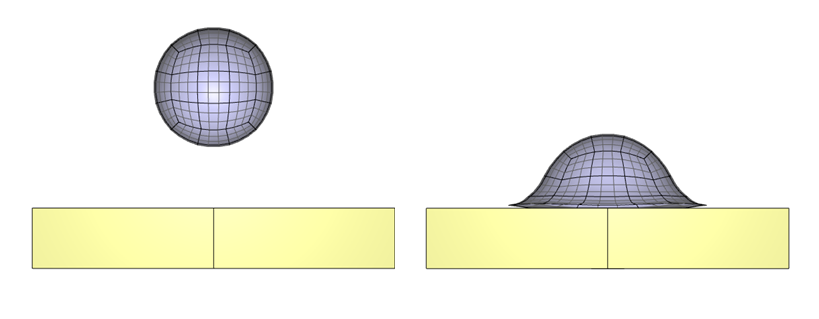
*UNIT_SYSTEM SI *TIME 0.001 *COMPONENT_SPHERE 1, 1, 3 0.0, 0.0, 0.03, 0.01 *COMPONENT_BOX 2, 2, 2, 2, 1 -0.03, -0.03, 0.0, 0.03, 0.03, 0.01 *CHANGE_P-ORDER P, 1, 3 *SMOOTH_MESH P, 1, 45.0 *MAT_MOONEY_RIVLIN 1, 1500.0, 3.0e9 1.0e6, 0, 1.0e2 *MAT_ELASTIC 2, 7800.0, 210.0e9, 0.3 *PART "rubber" 1, 1 "steel" 2, 2 *INITIAL_VELOCITY P, 1, 0.0, 0.0, -100.0 *CONTACT "rubber to steel" 1 P, 1, P, 2, 0.1 *END
Rubber sphere and steel block before and after impact
Arbitrary friction law

By referring to a FUNCTION, the coefficient of friction can be defined to depend on contact pressure (pres), local coordinate (x, y, z) and on the relative sliding velocity (vtang). The following example defines a transition between a static and a dynamic coefficient of friction.

*PARAMETER mu_static = 0.3 mu_dynamic = 0.1 C = 5.0 *CONTACT P, 333, P, 333, fcn(12), -1.0e13 *FUNCTION 12 %mu_static + (%mu_dynamic - %mu_static)*(1 - exp(-%C*vtang))
Initial contact penetration

This complete input deck illustrates how delta_0_offset and delta_0_max control initial penetration in contact. It compares the default behavior with an offset larger than the initial overlap and with a maximum allowed initial penetration.

*UNIT_SYSTEM SI *PARAMETER %tend = 0.001, "Termination time", 0, time %thickness = 1.0, "Element thickness", 0, length %overlap = 0.02, "Initial overlap", 0, length %delta_offset = 0.03, "Initial penetration offset", 0, length %delta_max = 0.01, "Maximum allowed initial penetration", 0, length %pfac = 1.0e15, "Penalty stiffness", 0, cstiff *TIME [%tend] *OUTPUT [%tend/5] # # --- MESH --- # # Contact pair 1: Default contact *COMPONENT_BOX "Default contact - left" 1, 1, 1, 1, 1 -0.5, 0.0, -0.5, 0.5, 1.0, 0.5 *COMPONENT_BOX "Default contact - right" 2, 2, 1, 1, 1 [0.5-%overlap], 0.0, -0.5, [1.5-%overlap], 1.0, 0.5 # # Contact pair 2: delta_0_offset *COMPONENT_BOX "delta_0_offset - left" 3, 3, 1, 1, 1 -0.5, 2.0, -0.5, 0.5, 3.0, 0.5 *COMPONENT_BOX "delta_0_offset - right" 4, 4, 1, 1, 1 [0.5-%overlap], 2.0, -0.5, [1.5-%overlap], 3.0, 0.5 # # Contact pair 3: delta_0_max *COMPONENT_BOX "delta_0_max - left" 5, 5, 1, 1, 1 -0.5, 4.0, -0.5, 0.5, 5.0, 0.5 *COMPONENT_BOX "delta_0_max - right" 6, 6, 1, 1, 1 [0.5-%overlap], 4.0, -0.5, [1.5-%overlap], 5.0, 0.5 # # --- MATERIAL --- # *MAT_METAL "aluminium" 1, 2700.0, 70.0e9, 0.33 10 *FUNCTION "flow stress" 10 220.0e6 + 120.0e6*(1 - exp(-4.5*epsp)) *PART "Default contact - left" 1, 1 "Default contact - right" 2, 1 "delta_0_offset - left" 3, 1 "delta_0_offset - right" 4, 1 "delta_0_max - left" 5, 1 "delta_0_max - right" 6, 1 # # # --- CONTACT 1: DEFAULT --- # The initial penetration is 0.02 m. # With delta_0_offset = 0, this produces an initial contact force. *CONTACT "1 - Default" 1 P, 1, P, 2, , [%pfac] # # # --- CONTACT 2: delta_0_offset --- # delta_0_offset = 0.03 m is larger than the initial penetration of 0.02 m. # The initial overlap is therefore accepted without an initial contact force. *CONTACT "2 - delta_0_offset = 0.03 m" 2 P, 3, P, 4, , [%pfac] , , , , [%delta_offset] # # # --- CONTACT 3: delta_0_max --- # delta_0_max = 0.01 m is smaller than the initial penetration of 0.02 m. # The penetrating faces are therefore released from the contact. *CONTACT "3 - delta_0_max = 0.01 m" 3 P, 5, P, 6, , [%pfac] , , , , , [%delta_max] *END